TwinMind now lives natively on your Desktop! Auto-detect meetings in Zoom, Meet, Teams and more, and get live transcripts and summaries in 140+ languages. With calendar reminders, join the call in one click and start capturing. A floating mic stays with you across every app and space: hold the hotkey to dictate, and a cleaned-up text pastes straight wherever you're writing.
We spend half our day in meetings and the other half typing up what happened. Current meeting recorders feel clunky, require annoying bot invites, and trap your notes in another browser tab. We built TwinMind to give you an easier way: it automatically turns your calls into clean notes in the background, and gives you instant voice typing right at your cursor so you never have to type out long updates again.
To make this truly seamless on your desktop, TwinMind lives as a quiet, native assistant that follows you across every desktop Space. You simply hold a hotkey, speak, and the transcribed text appears instantly right where your cursor is. The background engine handles meeting transcription so your calls convert into structured notes without any extra steps.
Getting transcription right was only half the battle. We spent most of our development time focusing on the details that make an app feel truly native. We optimized the background recording stability so it survives system sleep or sudden headset disconnections, built google calendar integration to join and record calls in a single tap.
We would love to hear your thoughts. What features or adjustments would make this an indispensable part of your daily workflow? The team and I are here all day to answer your questions and listen to your feedback.
The MCP stuff is really cool! but do the other people on the call get any heads up that it’s recording? or is that up to whoever’s using it
Full disclosure, I work at TwinMind. I keep the desktop app running through my entire day. The TwinMind MCP is my favorite part: I connect it to Claude, pull in what was discussed, and go straight to building prototypes from real meeting context. Total game changer.
skipping the bot is the right call. but in last 3 days, i have seen at least 4-5 products with exact same thing, getting launched. What makes TwinMind better?
I love using the desktop app! I capture all day and leave it on in the background (even if i get phone calls, it works)
With the latest update of TwinMind MCP, you can power your AI agents with real-time context. This is a game changer for your work flows.
TwinMind used to be great, until they removed integrations and combined everything into google integration. I used to be able to sync my local calendar (iOS). Not anymore, unless I sync my calendar with Google.
I used to be able to use the MCP server as a Pro member. Not anymore, now they want me to upgrade my membership AGAIN.
I'm very privacy-focused, and TwinMind has regressed in this regard, from my view. Google is pretty much an evil company, and I refuse to continue using TwinMind after forcing everything to proxy through google service.
I removed the app and now use Openwhispr on MacOS to record my meetings. Not as polished and smooth, but I'm not forced to be in bed with Google.
My favorite workflow: I ask Claude, 'Pull my last meeting from TwinMind and update the project dashboard with every decision, owner, and deadline we agreed on.' Thirty seconds later it's done, and nobody had to take notes.
surviving headset disconnects is the kind of detail that matters for a meeting recorder. does the floating mic still work when a call is full screen on its own Space?
keeping the original dictation one shortcut away would be useful
especially when the cleanup changes a name or a number
Easily the best transcriber out there. Have used it at multiple occasions and it has never disappointed me. They will blow up i am so sure (if not yet)
The work on sleep and headset disconnects caught my eye. Those are exactly the interruptions where I would want a meeting recorder to tell me clearly whether it was still capturing.
About TwinMind for Desktop on Product Hunt
“Transcribe meetings and dictate anywhere on Mac & Windows”
TwinMind for Desktop launched on Product Hunt on October 21st, 2026 and earned 165 upvotes and 22 comments, placing #5 on the daily leaderboard. TwinMind now lives natively on your Desktop! Auto-detect meetings in Zoom, Meet, Teams and more, and get live transcripts and summaries in 140+ languages. With calendar reminders, join the call in one click and start capturing. A floating mic stays with you across every app and space: hold the hotkey to dictate, and a cleaned-up text pastes straight wherever you're writing.
TwinMind for Desktop was featured in Productivity (663.7k followers), Notes (8.4k followers) and Artificial Intelligence (481.8k followers) on Product Hunt. Together, these topics include over 306.9k products, making this a competitive space to launch in.
Who hunted TwinMind for Desktop?
TwinMind for Desktop was hunted by Kartikey Sharma. A “hunter” on Product Hunt is the community member who submits a product to the platform — uploading the images, the link, and tagging the makers behind it. Hunters typically write the first comment explaining why a product is worth attention, and their followers are notified the moment they post. Around 79% of featured launches on Product Hunt are self-hunted by their makers, but a well-known hunter still acts as a signal of quality to the rest of the community. See the full all-time top hunters leaderboard to discover who is shaping the Product Hunt ecosystem.
Want to see how TwinMind for Desktop stacked up against nearby launches in real time? Check out the live launch dashboard for upvote speed charts, proximity comparisons, and more analytics.

 Kartikey Sharma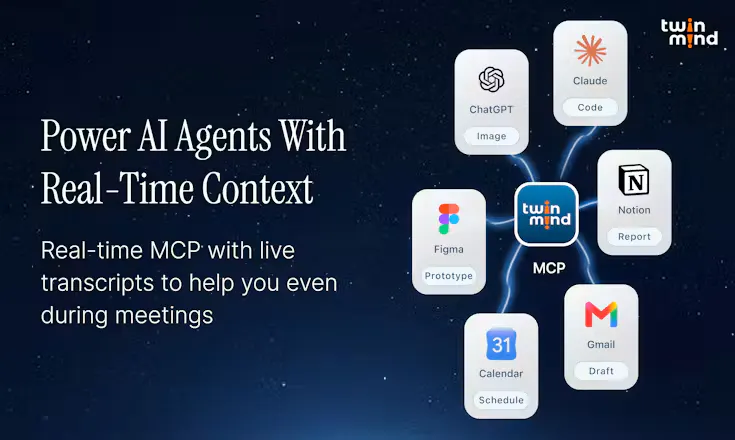
Hey Product Hunt 👋
We spend half our day in meetings and the other half typing up what happened. Current meeting recorders feel clunky, require annoying bot invites, and trap your notes in another browser tab. We built TwinMind to give you an easier way: it automatically turns your calls into clean notes in the background, and gives you instant voice typing right at your cursor so you never have to type out long updates again.
To make this truly seamless on your desktop, TwinMind lives as a quiet, native assistant that follows you across every desktop Space. You simply hold a hotkey, speak, and the transcribed text appears instantly right where your cursor is. The background engine handles meeting transcription so your calls convert into structured notes without any extra steps.
Getting transcription right was only half the battle. We spent most of our development time focusing on the details that make an app feel truly native. We optimized the background recording stability so it survives system sleep or sudden headset disconnections, built google calendar integration to join and record calls in a single tap.
We would love to hear your thoughts. What features or adjustments would make this an indispensable part of your daily workflow? The team and I are here all day to answer your questions and listen to your feedback.
Thank you for checking us out today!