


This product was not featured by Product Hunt yet.
It will not be visible on their landing page and won't be ranked (cannot win product of the day regardless of upvotes).
Product upvotes vs the next 3
Product comments vs the next 3
Product upvote speed vs the next 3
Product upvotes and comments
Product vs the next 3
StoryRuler
See your story while you cut.
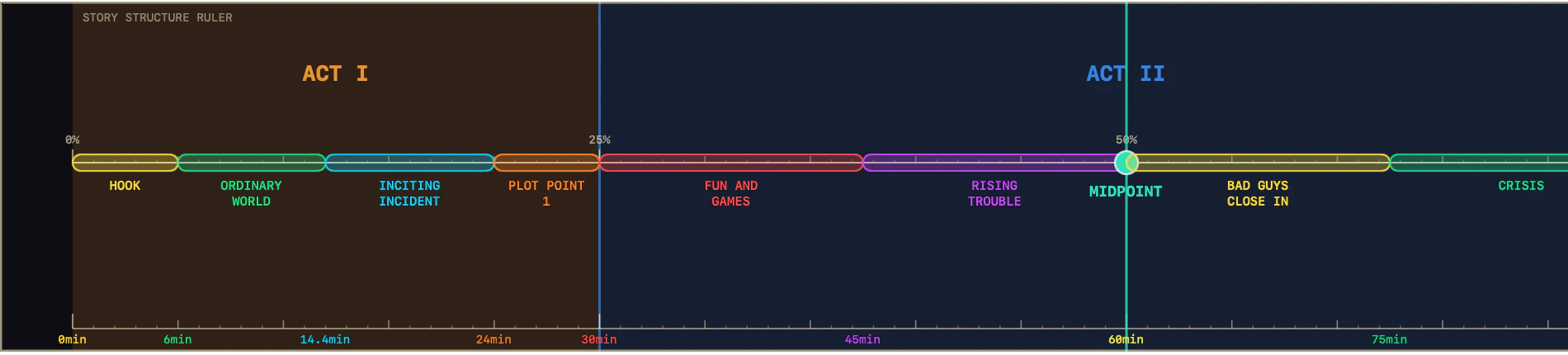
StoryRuler is a lightweight macOS overlay for video editors. It sits above Premiere Pro, DaVinci Resolve, Final Cut Pro, or any other editor, and shows a visual story structure guide directly over your timeline. No plugins. No setup. Just a transparent ruler that helps you see pacing, structure, and key story beats while you cut. Built-in templates include Three-Act Structure and Save the Cat! Beat Sheet, with support for custom markers and structures.
Top comment
Hey Product Hunt, I built StoryRuler because pacing is one of the hardest things to explain while editing. Editors can usually feel when a cut is slow, rushed, or slightly off, but that instinct often lives only in your head. It can be hard to communicate with other editors, producers, clients, or even your future self during a later pass. StoryRuler is a small macOS overlay that sits above your editing timeline and keeps story structure visible while you cut. It is not a plugin, so it works with Premiere Pro, DaVinci Resolve, Final Cut Pro, and other editors. You can turn on click-through mode, adjust opacity, move it anywhere, and use built-in templates like Three-Act Structure and Save the Cat! Beat Sheet. The goal is not to replace editorial instinct. It is to make pacing and structure easier to see, discuss, and refine. I’d love feedback from video editors, filmmakers, YouTubers, and anyone who thinks visually while cutting. Does this feel useful, or too niche?
About StoryRuler on Product Hunt
“See your story while you cut.”
StoryRuler was submitted on Product Hunt and earned 0 upvotes and 1 comments, placing #104 on the daily leaderboard. StoryRuler is a lightweight macOS overlay for video editors. It sits above Premiere Pro, DaVinci Resolve, Final Cut Pro, or any other editor, and shows a visual story structure guide directly over your timeline. No plugins. No setup. Just a transparent ruler that helps you see pacing, structure, and key story beats while you cut. Built-in templates include Three-Act Structure and Save the Cat! Beat Sheet, with support for custom markers and structures.
On the analytics side, StoryRuler competes within Mac, Productivity and Video — topics that collectively have 765.8k followers on Product Hunt. The dashboard above tracks how StoryRuler performed against the three products that launched closest to it on the same day.
Who hunted StoryRuler?
StoryRuler was hunted by underground_analog. A “hunter” on Product Hunt is the community member who submits a product to the platform — uploading the images, the link, and tagging the makers behind it. Hunters typically write the first comment explaining why a product is worth attention, and their followers are notified the moment they post. Around 79% of featured launches on Product Hunt are self-hunted by their makers, but a well-known hunter still acts as a signal of quality to the rest of the community. See the full all-time top hunters leaderboard to discover who is shaping the Product Hunt ecosystem.
For a complete overview of StoryRuler including community comment highlights and product details, visit the product overview.