This product was not featured by Product Hunt yet. It will not be visible on their landing page and won't be ranked (cannot win product of the day regardless of upvotes).
Product upvotes vs the next 3
Waiting for data. Loading
Product comments vs the next 3
Waiting for data. Loading
Product upvote speed vs the next 3
Waiting for data. Loading
Product upvotes and comments
Waiting for data. Loading
Product vs the next 3
Loading
Phone Desk
Samsung DEX & Pixel desktop mode on your Mac Display
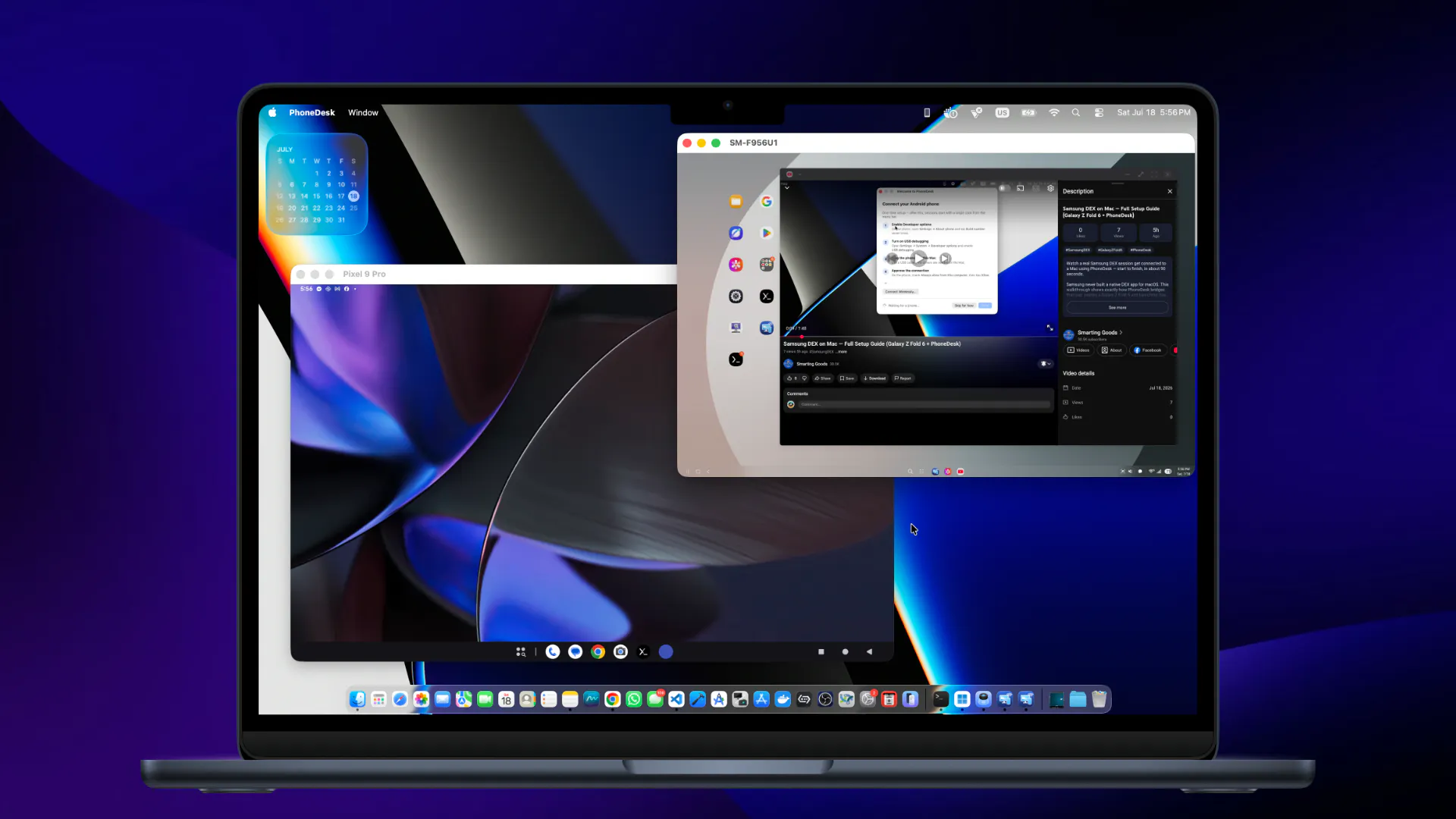
Samsung killed DeX support for PC and Mac — if you've got a Galaxy Z Fold/Flip or a Pixel with desktop mode, your only options were a second monitor, a DeX dock, or nothing. PhoneDesk is a macOS menu bar app that drives your phone's own desktop mode —Samsung DEX or Pixel desktop mode — as a real, resizable window right on your Mac. Not a screen mirror crammed into a box: actual desktop-mode windows, drag and resize like any other Mac app.
I built phonedesk is because as a digital nomad often found myself working in a coffeeshop, so being portablility is important for me. the stack in my bag most of the times are my M3 macbook pro, samsung z fold 6, pixel 9 pro, usb cable. though these flagship devices are not that new but they are really capable machines and most of the time, i realize the pixel 9 pro stay inside my bag, the fold staying beside my mac which needily for my touch. Recently i rooted my pixel 9 pro to make some use out of it, and i found that i really like the pixel camera for picture and recording compare to the fold, so having to bring all these devices but the main workhorse is still my mac. The M3 Macbook Pro 14# is such a fine piece of tech, the hardware ( keyboards, display, trackpad, speakers,) is so good, the OS is just so smooth, and the chip is so powerful, so i though what if there is a MacOS App that can help me connect all of my android devices, i thought if the pixel 9 pro and the samsung z fold 6 already have desktop mode and dex desktop experience that natively come with it, why not connected to my mac and use it as a screen on my mac, this way i can control both phone using the mac's keyboard and trackpad. i did some research a found out, these android devices need an actually monitor, addition with keyboard and mouse to use dex or android desktop mode. for whatever reasons google and samsung doesnt offer any solution to use these amazing feature on the mac, or they did but killed it. and this was the reason i started to build PhoneDesk, a solution for my MacOS - Android stack, phone desk allow me to simply connect my android to mac via usb or wirelessly. now i can simply choose which device i want to use on my mac display, using mac native keyboard and track pad, everthing seem to work flawlessly. crazy thing is i can activate both phone simutanously to use as desktop mode. though this can be simply switch desktop display from mac to pixel to dex desktop mode, the latency could drop if use wifi. remember im still at the coffeeshop now streaming 2 androids devices via wifi for desktop mode so there is some latency here and there. to battle this i plug in my usb-c to usb-c and the experience change dramatically for latency. it just feel also to native as im using on the external monitor. one of the anoying thing i found about phonedesk is that when active in desktop mode, it create the overlay on the phone which i couldnt move or minimize, but that could easily be fix by using mac shortcut ( Option + O ) to turn off display on phone, to safe battery or ( Option + Shift + O ) to turn it back on. though this issue is annoying but i found it making me not wanting to hold my phone while active desktop mode is on, this way i can just stay dead focus by just using my mac and have full control of my phone in desktop mode. after spending alot of time testing, i found that natively i can drag files into the phone desktop mode from mac, and the images, videos, files just end up in phone Downloads folder, but if i want to send files from phone to mac, it just not possible, that's why phonedesk introduce the companion app, when you first connect your phone with PhoneDesk on mac for the first time, the app just install the companion app on your phone automatically. this way if your phone is in the desktop mode on mac, you can just simply open your phone file manager, photo, gallery and directly drag files to transfer to your mac, and the files will apprear in your mac downloads folder. this file shares is bothway now and is available via wifi or usd-c cable. Now i can use my pixel to records reel, vlogs, take picture etc.. and send it to my mac to edit on final cut seemingly without needing another app solution just for this. But i was not satisfy there, i thought to myself, if the samsung is unfold sitting there next to my mac , all beautiful and shiny and yet the display is useless is such a waste. So i dig deep and dive in head first, to a solution to turn my connected android phone into the macbook external display, this way i can extend my portable stack into somewhat a portable work station making multitask on multiple screens possible. and that is exactly what PhoneDesk did and it did very very well with realtime external display experience. the ealier version of PhoneDesk turning devices into mac external display, it was really good over usb but very good but over wifi is verry laggy and alot of corruptions. but i thought of some ideas to make use of phonedesk companion app to make the experience over wifi better, close to real time experience, and the result through alot of testing yeild more than what i expected at such high resolution over wifi. now i can easily plug in the usb c cable to the pixel to use desktop mode on my rooted phone while extend the macbook display into the fold inner display over wifi , and both perform really well with my M3 mac at a coffee shop. i can enjoy these old flagship devices by sipping a cup of ice coffee :)) Honestly i dont want to settle here with PhoneDesk current version, because i can see alot of things i want to improve, especially the dual mode where as if i only have the pixel with me, i want to be able to use desktop mode on my mac and the display as external monitor, but all at came to a wall as google still limiting the features with android desktop mode in current android 16, new android 17 is promising but i havent got that far yet. due to personal life circumstances im forced to launch Phonedesk at this stage, though im happy with the result and performance phonedesk bring into my workflow. for the last 3 years i stop my freelance website design gig to fully learn programming and build software, all my reserve fund is spent, apple developer membership recently expire, with a toddler constantly asking to buy him toys because i spent way too much time on building this craft. As of right now PhoneDesk is only $25 for lifetime license for early supporter. i think in the future this will be a $25 yearly subscription fee or something similar to keep me afloat and continue working on my passion for making productivity software. if you read up to this line, thank you so much for your anticipation on Phonedesk Launch on Product Hunt. Thank you
About Phone Desk on Product Hunt
“Samsung DEX & Pixel desktop mode on your Mac Display”
Phone Desk was submitted on Product Hunt and earned 9 upvotes and 14 comments, placing #157 on the daily leaderboard. Samsung killed DeX support for PC and Mac — if you've got a Galaxy Z Fold/Flip or a Pixel with desktop mode, your only options were a second monitor, a DeX dock, or nothing. PhoneDesk is a macOS menu bar app that drives your phone's own desktop mode —Samsung DEX or Pixel desktop mode — as a real, resizable window right on your Mac. Not a screen mirror crammed into a box: actual desktop-mode windows, drag and resize like any other Mac app.
On the analytics side, Phone Desk competes within Android, Mac and Menu Bar Apps — topics that collectively have 173.8k followers on Product Hunt. The dashboard above tracks how Phone Desk performed against the three products that launched closest to it on the same day.
Who hunted Phone Desk?
Phone Desk was hunted by Smarting Goods. A “hunter” on Product Hunt is the community member who submits a product to the platform — uploading the images, the link, and tagging the makers behind it. Hunters typically write the first comment explaining why a product is worth attention, and their followers are notified the moment they post. Around 79% of featured launches on Product Hunt are self-hunted by their makers, but a well-known hunter still acts as a signal of quality to the rest of the community. See the full all-time top hunters leaderboard to discover who is shaping the Product Hunt ecosystem.
For a complete overview of Phone Desk including community comment highlights and product details, visit the product overview.

 Smarting Goods